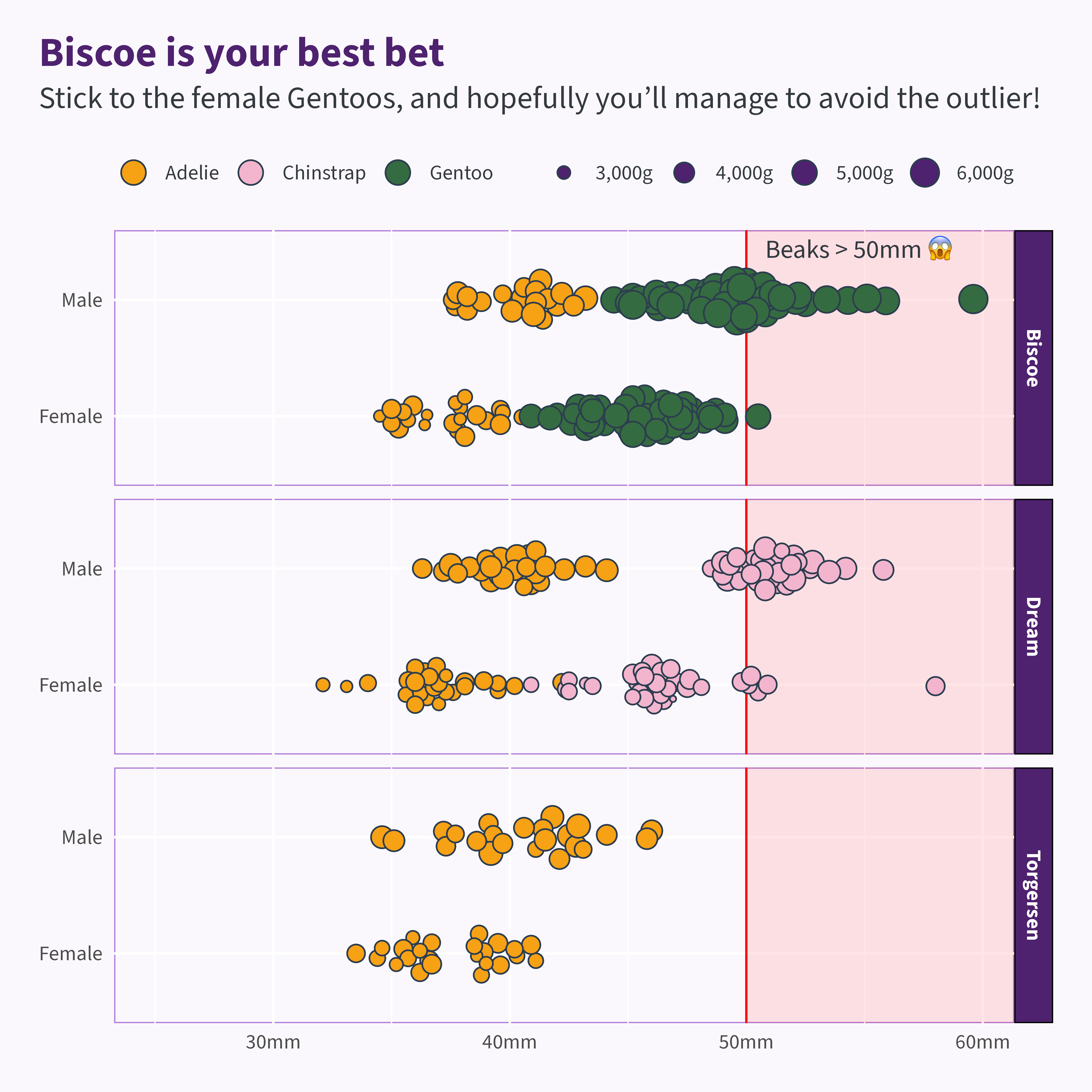
library (ggplot2)<- penguins |> :: filter (! is.na (sex))<- c ("Chinstrap" = "#F2B5CD" ,"Adelie" = "#F7A115" ,"Gentoo" = "#356B40" <- function (base_text_size = 20 ) {theme_minimal (base_size = base_text_size) + theme (text = element_text (family = "Source Sans 3" , colour = "#343a40" ),geom = element_geom (family = "Source Sans 3" ,ink = "#343a40" ,pointshape = 21 ,pointsize = 5 ,linewidth = 0.5 ,fill = "#4e226f" axis.title = element_blank (),legend.position = "top" ,legend.title = element_blank (),strip.background = element_rect (fill = "#4e226f" ),strip.text = element_text (colour = "white" , face = "bold" ),panel.background = element_rect (colour = "#b17ed8" , fill = "#FBF8FD" ),plot.background = element_rect (fill = "#FBF8FD" , colour = "#FBF8FD" ),panel.grid = element_line (colour = "white" ),plot.title.position = "plot" ,plot.title = ggtext:: element_textbox_simple (size = rel (1.6 ),colour = "#4e226f" ,face = "bold" ,margin = margin (0 , 0 , base_text_size / 2 , 0 )plot.subtitle = ggtext:: element_textbox_simple (size = rel (1.2 ),margin = margin (0 , 0 , base_text_size, 0 ),lineheight = 1.3 plot.margin = margin_auto (base_text_size * 1.5 )|> ggplot () + annotate ("rect" ,xmin = 50 ,xmax = Inf ,ymin = - Inf ,ymax = Inf ,fill = alpha ("red" , 0.1 )+ geom_text (data = penguins |> dplyr:: filter (island == "Biscoe" ) |> head (1 ),aes (x = 50 , y = I (0.925 ), label = "Beaks > 50mm 😱" ),hjust = - 0.1 + geom_vline (xintercept = 50 , colour = "red" ) + geom_point (aes (x = bill_len, y = sex, fill = species, size = body_mass),position = ggbeeswarm:: position_quasirandom (width = 0.2 ),shape = 21 ,colour = "#2c3d4f" + scale_fill_manual (values = penguin_colours+ scale_y_discrete (labels = function (x) stringr:: str_to_sentence (x)) + scale_x_continuous (limits = c (25 , NA ), labels = function (x) paste0 (x, "mm" )) + scale_size (labels = scales:: label_comma (suffix = "g" )) + labs (title = "Biscoe is your best bet" ,subtitle = "Stick to the female Gentoos, and hopefully you'll manage to avoid the outlier!" + facet_grid ("island" ) + guides (fill = guide_legend (override.aes = list (size = 5 ))+ theme_maineR (base_text_size = 12 )